Usage Statistics
- Aggregated items available in Usage Statistics
- How to specify filter conditions
- How to generate an AI Analysis Report
Usage Statistics lets you aggregate space visit counts and conversation log counts over a specified period, and generate an AI Analysis Report (added in v1.16.0).
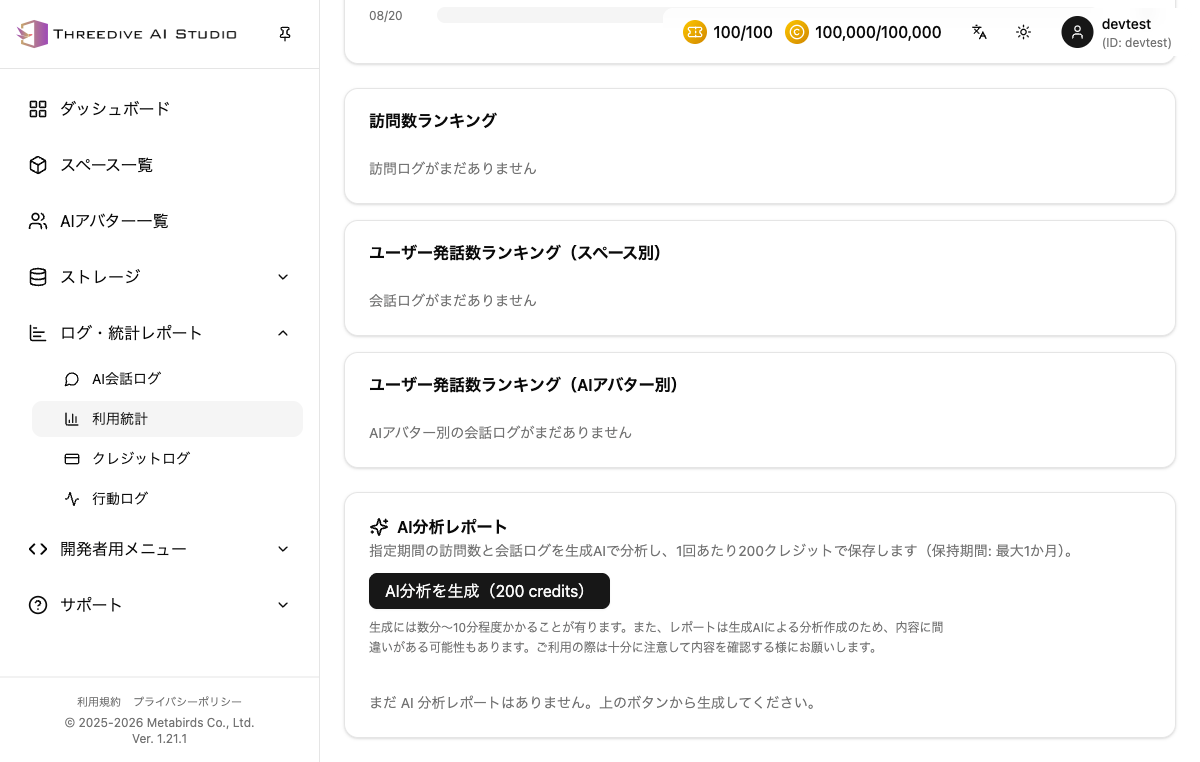 Usage Statistics screen - filter conditions, aggregated results, and AI Analysis Report generation
Filter Conditions
| Item | Description |
|---|---|
| Start Date / End Date | Specify the period to aggregate |
| Space | Specify the target space to aggregate (default: entire account) |
| AI Avatar | Specify the target AI Avatar to aggregate (default: all) |
| Exclude preview conversations from aggregation | Excludes AI Avatar preview and space preview conversations from aggregation (published space visit counts don't include preview visits to begin with) |
Specify the conditions and click "Aggregate". Click "Reset" to restore the conditions to their initial state.
Aggregated Results
- Space Visit Count: Number of times a published space was loaded
- Conversation Log Count: Total of user statements and AI responses
- User Statement Count: Statements saved with the
userrole - Conversation Session Count: Conversation sessions occurring during the period
- AI Response Count: Responses saved with the
assistantrole
Visit Trend
Check the daily increase/decrease in visit counts with a line chart and a daily list.
Other Aggregations
- Share by AI Avatar: Visualizes user statements during the period by AI Avatar
- Space Visit Trend: Shown color-coded by space when viewing the entire account
- Visit Count Ranking
- User Statement Count Ranking (by Space)
- User Statement Count Ranking (by AI Avatar)
AI Analysis Report
You can have generative AI analyze visit counts and conversation logs for a specified period, and save the result as a report.
- Credit cost: 200 credits (per generation)
- Retention period: up to 1 month
- Generation may take a few minutes to about 10 minutes
Since the report is created by generative AI analysis, it may contain inaccuracies. Please review the content carefully before use.
Click the "Generate AI Analysis" button to start generation.