Space JSON Specification
Overview
This is the JSON format specification for defining 3D scenes and entities (objects) in Threedive AI.
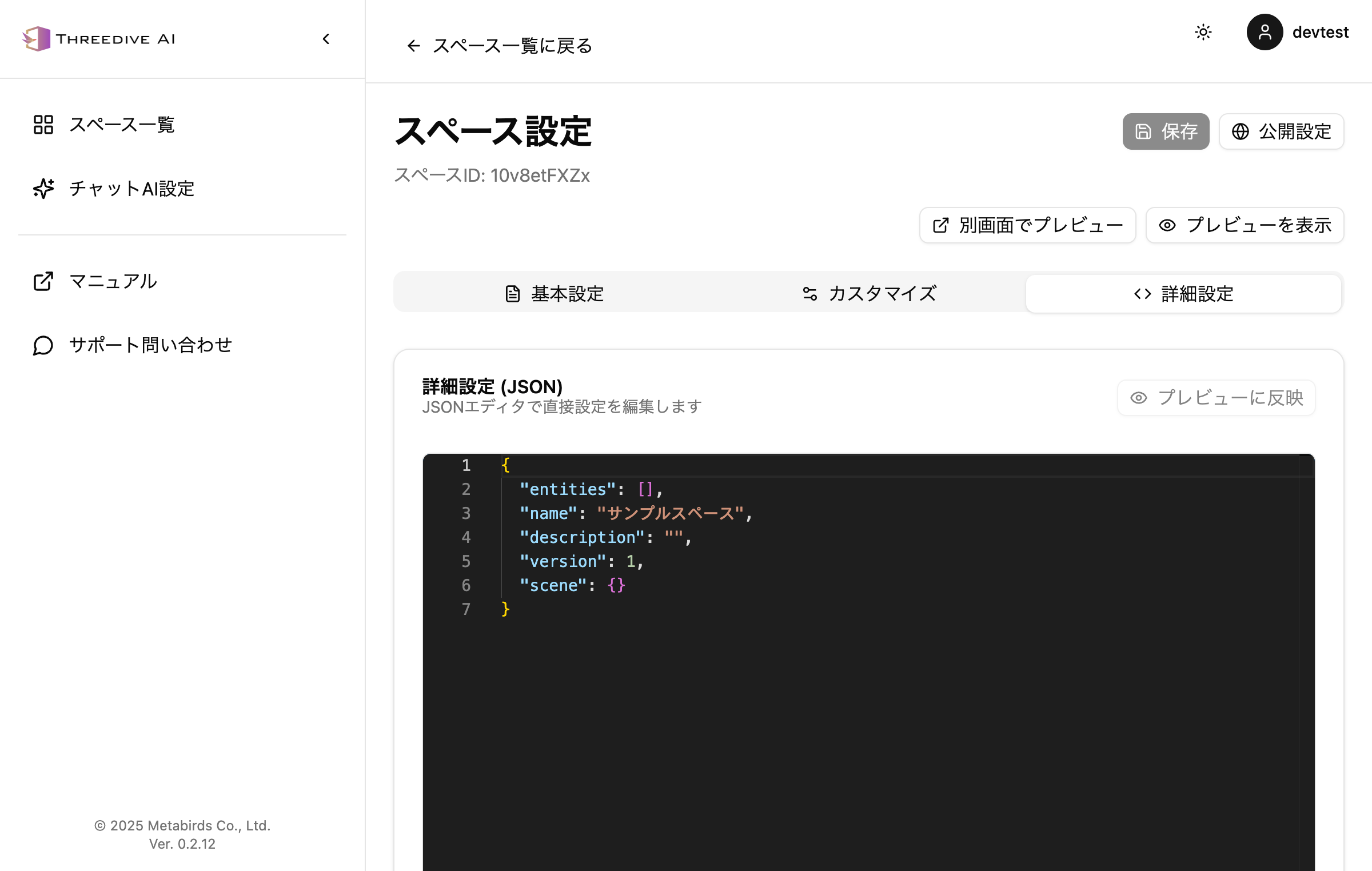 Advanced Settings Tab in Space Settings - Direct editing with JSON editor
Basic Specifications
- Coordinate System: Right-handed coordinate system (Y-axis is up)
- Position Unit: Meters
- Rotation Unit: Radians (Euler angles)
- Character Encoding: UTF-8
Top-Level Fields
| Field Name | Type | Required | Description |
|---|---|---|---|
entities | array | ✓ | Array of entities in the scene |
name | string | Scene name (for display) | |
sceneId | string | Internal identifier for the scene | |
description | string | Scene description | |
version | number | JSON format version | |
scene | object | Scene-wide settings | |
sceneTitle | string | Display title for the scene |
scene Object
| Field Name | Type | Default | Description |
|---|---|---|---|
initialPosition | [number, number, number] | [0,0,0] | Initial camera position [x,y,z] |
initialRotation | [number, number, number] | [0,0,0] | Initial camera rotation [x,y,z] |
url | string | Path to scene file (GLB, etc.) |
Entity Fields (within entities array)
Basic Fields
| Field Name | Type | Required | Default | Description |
|---|---|---|---|---|
id | string | ✓ | Unique identifier (UUID format recommended) | |
type | string | ✓ | Entity type ("model", "light", "audio", etc.) | |
name | string | Display name for the entity | ||
description | string | "" | Entity description | |
url | string | △ | Resource file path (required when type is model) |
Transform Fields
| Field Name | Type | Default | Description |
|---|---|---|---|
position | [number, number, number] | [0,0,0] | Position [x,y,z] (meters) |
rotation | [number, number, number] | [0,0,0] | Rotation [x,y,z] (radians) |
scale | [number, number, number] | [1,1,1] | Scale [x,y,z] (multiplier) |
Behavior Fields
| Field Name | Type | Default | Description |
|---|---|---|---|
animationName | string | Animation name to play | |
interactive | boolean | false | Flag for guest user interactivity |
chatRadius | number | 0 | Conversation range radius (meters) |
aiConfigId | string | AI configuration reference ID |
Minimal Configuration Example
{
  "entities": [
    {
      "id": "09be23d0-e530-42d6-b797-22c294539ba6",
      "type": "model",
      "name": "ネコ",
      "url": "/avatars/animal01/Model_catw.glb",
      "position": [0, -0.5, -5]
    }
  ],
  "sceneId": "park",
  "name": "sample park"
}
Complete Configuration Example
{
  "entities": [
    {
      "id": "09be23d0-e530-42d6-b797-22c294539ba6",
      "type": "model",
      "name": "ネコ",
      "description": "パーク内のネコキャラクター",
      "url": "/avatars/animal01/Model_catw.glb",
      "position": [0, -0.5, -5],
      "rotation": [0, 0, 0],
      "scale": [1, 1, 1],
      "animationName": "CharacterArmature|Idle",
      "interactive": false,
      "chatRadius": 3,
      "aiConfigId": "J4cMw37Ywp"
    }
  ],
  "name": "sample park",
  "sceneId": "park",
  "description": "parkシーンの公開用サンプル",
  "version": 1,
  "scene": {
    "initialPosition": [0, 0, 0],
    "initialRotation": [0, -3.14, 0],
    "url": "/scenes/park/CYZYPark.glb"
  },
  "sceneTitle": "パーク"
}
Important Notes
ID Management
- Use UUID v4 format for
idfield (e.g., "09be23d0-e530-42d6-b797-22c294539ba6") - Always generate a new UUID when creating new entities to avoid duplicates
Path Specification
- Use relative paths (starting with "/") or absolute URLs for
urlfield - Be aware of CORS configuration (when loading resources from different domains)
Coordinates and Rotation
- position: Y-axis adjustment may be necessary depending on the model's origin (ground contact point)
- rotation: Radians (π = 180 degrees, 2π = 360 degrees)
- Rotation order: Euler angles XYZ order (unified across the project)
Required Fields by Type
type: "model"→urlfield requiredtype: "light"→ Add light source configuration fieldstype: "audio"→ Specify audio file withurlfield
AI Feature Integration
chatRadius: Enable conversation range with values greater than 0aiConfigId: Specify an existing AI configuration ID (undefined IDs are ignored)interactive: Enable interaction with guest users when set to true