v1.17.0
· 2 min read

(English below)
🎉 New Features
English Display Now Supported
You can change the language using the following operations.
Threedive AI Studio
Click the "文A" icon in the upper right corner of Threedive AI Studio to switch languages.

Threedive AI
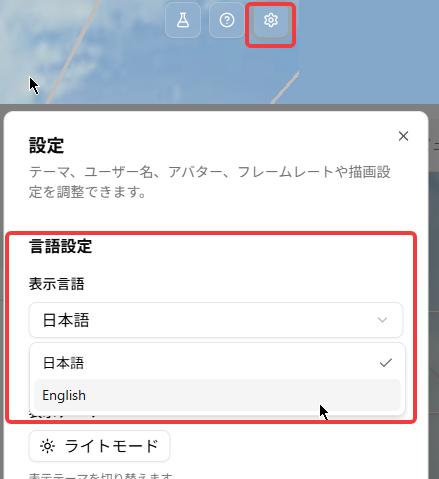
- Open the settings dialog from the gear ⚙ icon in the upper right corner of the 3D screen.
- Switch under Language Settings.
🔧 Adjustments and Bug Fixes
- Fixed an issue where the layout of the "Usage Statistics" feature could appear broken.
🎉 New Features
English language support added
You can switch the language using the steps below.
Threedive AI Studio
Click the "文A" icon in the upper right corner of Threedive AI Studio to switch languages.
Threedive AI
- Open the settings dialog from the gear ⚙ icon in the upper right corner of the 3D view.
- Switch the language under Language Settings.
🔧 Fixes & Adjustments
- Fixed an issue where the layout of the "Usage Statistics" feature could appear broken.