v1.8.0
· 2 min read

🎉 New Features
🟢 "User Operation Control" Feature Added
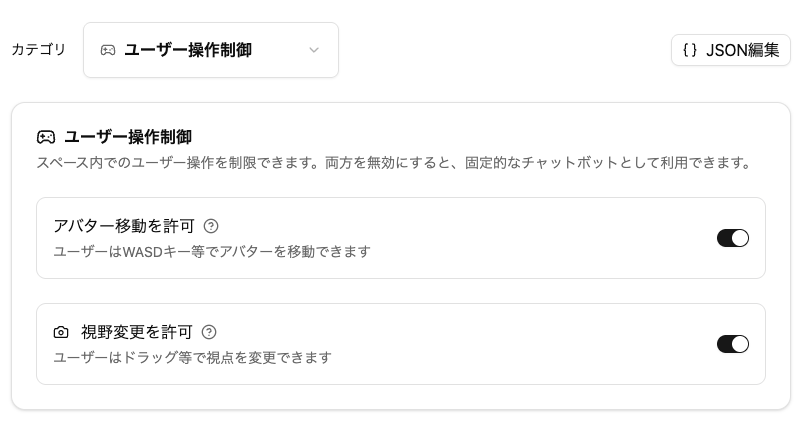
Added "User Operation Control" to each Space's settings.
You can restrict user operations within the Space.
- Allow Avatar Movement ON (default) / OFF
- Allow View Change ON (default) / OFF
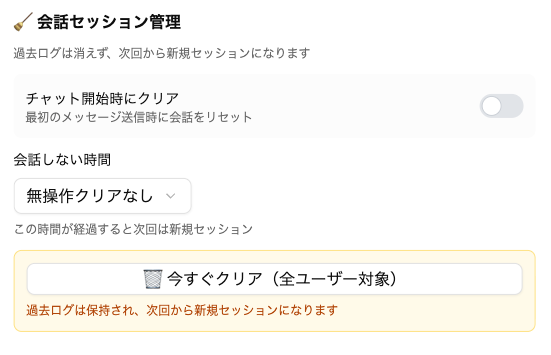
🟢 "Conversation Session Management" Feature Added (When Using Dify)
When calling Dify, you can now set how long to continue conversations from previous sessions.
info
This is displayed only when you select a setting in "AI Model Settings" with Dify connected as the "Generative AI Provider"
info
You can add "Generative AI Provider" items from "Developer Menu" > "Generative AI Provider Settings".
🟢 Rendering Options Added to "Panel Placement"
-
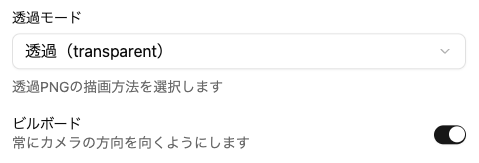
Transparency Mode
- You can now select from three transparency modes for panel rendering: "Default (Opaque)", "Transparent", and "Alpha Test". This allows for more precise control over the display of transparent PNGs and similar content.
- You can now select from three transparency modes for panel rendering: "Default (Opaque)", "Transparent", and "Alpha Test". This allows for more precise control over the display of transparent PNGs and similar content.
-
Billboard
- You can now set the billboard feature to make panels always face the camera. This ensures that panels face forward from any viewing angle.
🟢 Adjusted Panel Popup Display Appearance
The following settings now display in a popup window style.
- Enlarge image for display
- Display specified URL in popup
🔧 Bug Fixes and Improvements
- Fixed an issue where normal voice conversations (non-realtime) would not work properly in some cases