v1.17.0
· 約2分

(English below)
🎉 新機能
英語表示に対応しました
以下の操作で変更することが可能です。
Threedive AI Studio
Threedive AI Studio 右上の「文A」と書かれたアイコンをクリックして切り替えます。

Threedive AI
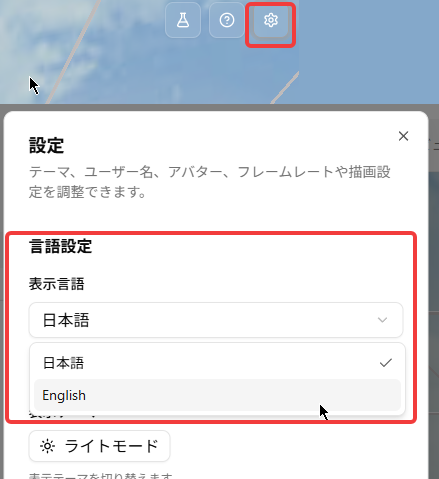
- 3D画面右上の歯車 ⚙ アイコンから設定ダイアログを開きます
- 言語設定で切り替えます。
🔧 調整・不具合修正
- 「利用統計」機能のレイアウトが崩れる場合があったのを修正しました。
🎉 New Features
English language support added
You can switch the language using the steps below.
Threedive AI Studio
Click the "文A" icon in the upper right corner of Threedive AI Studio to switch languages.
Threedive AI
- Open the settings dialog from the gear ⚙ icon in the upper right corner of the 3D view.
- Switch the language under Language Settings.
🔧 Fixes & Adjustments
- Fixed an issue where the layout of the "Usage Statistics" feature could appear broken.